
📚 Placeholders
Placeholders are dynamic variables that get replaced with actual values when commands execute. They provide access to player data, entity information, block properties, and much more.
Quick Reference
:::tip Numerical Operations All numerical placeholders support arithmetic operations:
- Increment:
%amount%+6(if %amount% = 15, result = 21) - Decrement:
%amount%-8(if %amount% = 14, result = 6)
You can also use PlaceholderAPI math placeholders:
- Example:
%math_0_(%usage%)*10% - EI placeholders are parsed before PlaceholderAPI placeholders :::
Core Placeholders
🎯 Player Placeholders
Player placeholders are available in the activators where a player is involved.
When the player is secondary in the activator : Replace player with target (e.g., %target_health%)
In ExecutableItems and ExecutableBlock the item/block can have an Owner. To get the placeholders of this owner : Replace player with owner (e.g., %owner_uuid%)
| Placeholder | Description |
|---|---|
%player% | Player's name |
%player_uuid% | Player's UUID |
%player_uuid_array% | Player's UUID with this format [I;-1288600659,-373273272,-1897203511,898446696] |
%player_world% | World name (%player_world_lower% for lowercase) |
%player_x%, %player_y%, %player_z% | Coordinates (add _int for integers) |
%player_pitch%, %player_pitch_positive% | Player's pitch (_int for integer) |
%player_yaw%, %player_yaw_positive% | Player's yaw (_int for integer) |
%player_direction% | Cardinal direction (N, SW, NE, etc.) |
%player_health% | Current health |
%player_max_health% | Maximum health |
%player_slot% | Slot that triggered the activator |
%player_slot_live% | Currently held slot |
%player_team% | Player's team (if any) |
%player_attack_charge% | Attack cooldown (1.0 = fully charged) |
%last_damage_taken% | Last damage received (_int for integer) |
%last_damage_dealt% | Last damage inflicted (_int for integer) VERSION |
%player_x_velocity%, %player_y_velocity%, %player_z_velocity% | Current X, Y, Z Velocity (_int for integer) |
🔄 Initial Player Placeholders
Captures player values at activator trigger time (won't change during execution):
%player_x_initial%,%player_y_initial%,%player_z_initial%%player_world_initial%%player_pitch_initial%,%player_yaw_initial%%player_direction_initial%
🗂️ Item Placeholders
| Placeholder | Description |
|---|---|
%name% | ExecutableItem's name |
%id% | ExecutableItem's ID |
%amount% | Amount in current stack |
%usage% | Current usage count |
%usage_roman% | Usage in Roman numerals |
%usage_bar(amount:30,color1:&d,color2:&5,symbol:I)% | Visual usage bar, more info bellow |
%usage_limit% | Maximum usage limit |
%durability% | Item durability (1.14+) |
%max_use_per_day_item% | Daily usage limit (item) |
%max_use_per_day_activator% | Daily usage limit (activator) |
Special: %usage_bar(amount:30,color1:&d,color2:&5,symbol:|)%
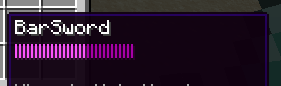
- Creates a visual usage bar
- Parameters: amount (bar count), color1 (used), color2 (unused), symbol
🐾 Entity Placeholders
Entity placeholders are available in the activators where an entity is involved.
When the entity is secondary in the activator : Replace entity with target (e.g., %target_x%)
| Placeholder | Description |
|---|---|
%entity% | Entity type (UPPERCASE) |
%entity_lower_case% | Entity type (lowercase) |
%entity_name% | Entity's custom name |
%entity_uuid% | Entity's UUID |
%entity_uuid_array% | Entity's UUID with this format [I;-1288600659,-373273272,-1897203511,898446696] |
%entity_x%, %entity_y%, %entity_z% | Coordinates (add _int for integers) |
%entity_health% | Current health |
%entity_max_health% | Maximum health |
%entity_world% | World name |
%entity_direction% | Facing direction |
%entity_pitch%, %entity_yaw% | Rotation values |
%entity_team% | Entity's team (if any) |
%entity_serialized% | Full entity definition |
%entity_last_damage_taken%, %entity_last_damage_taken_final%, %entity_last_damage_taken_final_with_booster% | Last damage received (add _int for integers) |
%entity_x_velocity%, %entity_y_velocity%, %entity_z_velocity% | Current X, Y, Z Velocity (_int for integer) |
🧱 Block Placeholders
Block placeholders are available in the activators where a block is involved.
When the block is secondary in the activator : Replace block with target_block (e.g., %target_block_x%)
| Placeholder | Description |
|---|---|
%block% | Block type (UPPERCASE) |
%block_lower% | Block type (lowercase) |
%block_live%, %block_live_lower% | Current block type |
%block_item_material% | Item form of block |
%block_x%, %block_y%, %block_z% | Coordinates (add _int for integers) |
%blockface% | Selected block face |
%block_world% | World name |
%block_biome% | Biome name |
%block_dimension% | World type (nether, normal, end) |
%block_spawnertype% | Spawner mob type |
%block_is_ageable% | Returns if the block is ageable or not |
%block_eb_id% | ExecutableBlock ID (if applicable) |
%block_data% | Block data value |
🏹 Projectile Placeholders
Projectile placeholders are available in the activators where a projectile is involved.
| Placeholder | Description |
|---|---|
%projectile% | Projectile type (UPPERCASE) |
%projectile_lower_case% | Projectile type (lowercase) |
%projectile_name% | Custom projectile name |
%projectile_uuid% | Projectile's UUID |
%projectile_uuid_array% | Projectile's UUID with this format [I;-1288600659,-373273272,-1897203511,898446696] |
%projectile_x%, %projectile_y%, %projectile_z% | Coordinates |
%projectile_world% | World name |
%bow_force% | Bow shot force (0-1) |
Special Placeholders
🎲 Utility Placeholders
| Placeholder | Description |
|---|---|
%rand:MIN|MAX% | Random number between MIN and MAX |
%timestamp% | Current timestamp |
%activator_id% | ID of current activator |
%activator_name% | Name of current activator |
📊 SCore Variables
Click here to have more info about SCore Variables
📊 Item/Block Variables
String/Number Variables:
%var_X%- Value of variable X%var_X_int%- Integer value of variable X (only for NUMBER type variables)%var_X_roman%- Roman numeral value (only for NUMBER type variables)
List Variables:
%var_MYVAR%- Full list with brackets%var_MYVAR_size%- Number of elements%var_MYVAR_contains_VALUE%- Check if list contains VALUE
⏱️ Cooldown Placeholders
Format: %score_cooldown_{plugin}:{object_id}:{activator_id}%
Examples:
%score_cooldown_EI:Free_Lottery:activator1%%score_cooldown_EB:MyBlock:activator2%
Command-Specific Placeholders
📝 AROUND & NEAREST Commands
Use player/entity placeholders with around_target prefix:
%around_target_direction%%around_target_health%%around_target_uuid%
⚔️ DAMAGE Commands
%score_cmd-damage-boost%- Current damage boost%score_cmd-damage-resistance%- Current damage resistance
💬 Message/Command Placeholders
For PLAYER_WRITE_COMMAND and PLAYER_SEND_MESSAGE:
%arg0%,%arg1%,%arg2%, etc. - Individual arguments%all_args%- All arguments%all_args_without_first%- All except first argument
Activator-Specific Placeholders
🎮 Event Placeholders
| Activator | Placeholders |
|---|---|
| RAID_TRIGGER | %player%, %badomenlevel% |
| RAID_WAVE | %raiders% (UUID list) |
| RAID_FINISH | %badomen%, %heroes% (UUID list) |
| PLAYER_EXPERIENCE_CHANGE | %experience% |
| PLAYER_RECEIVE_EFFECT | %effect_received%, %effect_received_level%, %effect_received_duration% |
| PLAYER_HIT_ENTITY | %critical% (true/false) |
| PLAYER_TELEPORT | %teleport_cause% |
| BROADCAST_MESSAGE | %message%, %is_async% |
| PLUGIN_ENABLE/DISABLE | %plugin_name% |
| PLAYER_ADVANCEMENT | %advancement% (Only for 1.19+) |
| PLAYER_RECEIVE_HIT_GLOBAL, PLAYER_RECEIVE_HIT_BY_PLAYER, PLAYER_RECEIVE_HIT_BY_ENTITY | %last_damage_taken_nonfinal%, %last_damage_taken_nonfinal_int%, Refers to the raw amount of damage taken. %last_damage_taken_final%, %last_damage_taken_final_int% Refers to the amount of damage taken after considering defense buffs such as attributes, resistance effect and armor. Only direct hits provide the correct value. Receive hits from projectiles return 0 |
| PLAYER_BLOCK_HIT_OF_PLAYER, PLAYER_BLOCK_HIT_OF_ENTITY | %damage_blocked_base%, %damage_blocked_base_int% Returns the raw damage blocked by the shield |
| PLAYER_PICKUP_ITEM (EE) | 1.13+%item_type%, %item_name%, %item_amount% 1.14-1.21.3 %item_cmdata% (-1 if null) 1.21.4+ %item_cmdata_s_0% ("null" if empty), %item_cmdata_f_0% (-1 if empty) (Returns the first string/float cmdata value since 1.21.4+ custom model data is stored in an array) |
| PLAYER_INVENTORY_CLICK (EE) | %is_shift_click%,%is_mouse_click%,%is_left_click%,%is_right_click%,%is_keyboard_click%,%is_creative_action%,%get_action% Reference Enum Values,%before_slot%,%after_slot%,%inventory_type% Reference Enum Values,%inventory_title% (1.21+) |
| PLAYER_KILL_ENTITY | %last_hitter%: Returns mob type of who dealt the last blow. This placeholder is relevant if you're trying to check whether you or your pet wolf dealt the last blow. Ex: PLAYER, WOLF |
Plugin-Specific Counts
ExecutableItems
%executableitems_checkamount%- Total EI in inventory- Arguments (Use commas between values to provide multiple values):
slot: Slots to check. Do not use this argument if you want all slots to be evaluated.id: ID of the ei item you want to check.owner: Only count if the owner value is correctowneruuid: Only count if the owner uuid value is correct
- Examples:
%executableitems_checkamount_slot:0,2,3%- EI in specific slots%executableitems_checkamount_id:item1,item2_slot:0,2%- Specific items in slots%executableitems_checkamount_owner:Special70%
%executableitems_checkvar%- Value / Total Value of Variable values- Arguments (Use commas between values to provide multiple values):
slot: Slots to check. Do not use this argument if you want all slots to be evaluated.id: ID of the ei item you want to check.var: The variable id you want to check.
- Examples:
%executableitems_checkvar_id:star_man_var:defense%%executableitems_checkvar_slot:-1,40_var:atk_bonus%%executableitems_checkvar_var:defense,bonus_defense%
- If the first detected variable value is a string, the value will be returned immediately.
- If the rest of the detected variable value is a number, it will add them all up and return the total value.
- Currently does not support list variables.
ExecutableBlocks
%executableblocks_checkamount%- Total EB in inventory- Arguments (Use commas between values to provide multiple values):
slot: Slots to check. Do not use this argument if you want all slots to be evaluated.id: ID of the ei item you want to check.owner: Only count if the owner value is correctowneruuid: Only count if the owner uuid value is correct
- Examples:
%executableblocks_checkamount_slot:0,2,3%- EB in specific slots%executableblocks_checkamount_id:block1,block2_slot:0,2%- Specific blocks in slots%executableblocks_checkamount_owner:Special70%
Tips & Best Practices
:::warning Important Notes
- %around_target%: If it fails, use
%around_target::step1% - World Names: Use
<<%player_world%>>for vanilla commands - Attack Charge: Resets after DAMAGE command, check value before using :::